NoSQL (MongoDB)
Dr. Andrew Besmer
Mongo Access
Getting Access to Mongo
- Shared with everyone, no individualized accounts
- Accessing mongo
mongo deltona.birdnest.org/csci355- Create all your collections in this same db
- User:
csci355Pass:csci355 db.auth('csci355', 'csci355');
- Groups do have accounts
$ mongo deltona.birdnest.org/group1
> db.auth('group1', 'group1');
Terms
RDBMS vs Document Oriented
- collection, document, and properties instead of table, row, and column
- These are a rough mapping, relational DBMS is not the same as document
- For example, properties can contain many objects, a column in RDBMS should contain an atomic value
| Doc Oriented | RDBMS |
|---|---|
| Collection | Table |
| Document | Row |
| Property | Column |
Databases
- A database is essentially the same as MySQL databases
- Each database houses it’s own files
- A database holds collections which will in turn hold documents
Databases
- There are typically many databases on a mongo server
- To specify which you want
usea databaseuse MyDatabaseName;- Note: If the database doesn’t exist, it will be created1 when you insert a document into a collection
- The
usecommand assigns the specified database to a variabledb - Type
dbto see which you are using
Collections
- Collections are similar to, but different from, MySQL tables
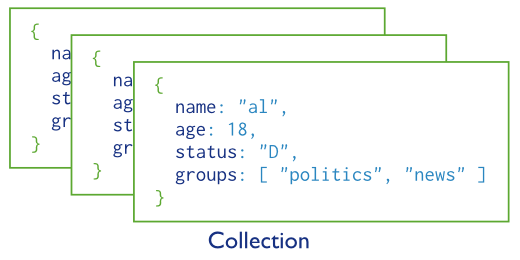
- Collections hold many documents (similar to rows), for example a
userscollection - Working with collections should be done through the variable
db
//Assign the variable db to the university database
use university;

/*
* Find all the documents in the
* university databases collection
* users
*/
db.users.find()
Collections
db.users.find()- Get all the documents in the users collection
Documents
Document Schema
- The document schema is simply the properties on the object to be persisted
- The following schema contains properties for
name- Name of the personage- Age of the personstatus- Current gradegroups- List of groups the person belongs to
{
  name: "Fred Duncan",                // <- field: value
  age: 22,                            // <- field: value
  status: "A",                        // <- field: value
  groups: [ "students", "employees" ] // <- field: value
}
Document Schema
- Notice in the relational model
groupswould violate 1NF and be considered bad design
{
  name: "Fred Duncan",                // <- field: value
  age: 22,                            // <- field: value
  status: "A",                        // <- field: value
  groups: [ "students", "employees" ] // <- field: value
}
Document Schema
- Documents within the same collection can have as many different schemas as you can put documents!
- Just because you can doesn’t mean you should!
- You can help, or hang yourself, with the flexibility.
{
  name: {
    first: "Sue",
    last: "Person"
  },
  age: 28,
  categories: [ {name : "students"}, {name: "honors"} ]
}
Document Schema
- Limited to max document size of 16M
- Property names can not start with
$or. - Take away is documents are very flexible in terms of schema so use wisely
Creation
Creating Databases
- Creating databases is as simple as using them with
useand inserting some data in a collection4 - Database will not be created until there is data in it!
- Can
show dbsto see which currently exist
Creating Collections
- Much like creating database simply insert to create the collection
db.users.insert({name:"Sue Person"});inserts a document and creates the collection if it doesn’t exist- Alternatively
db.createCollection()can be used to create the collection without inserting data - Use
show collections;ordb.getCollectionNames();to see a list
Creating Collections
db.createCollection()allows for custom collection creation- Check out the capped collection
sizeis bytesmaxis n
db.createCollection(name, {
  capped: <boolean>,
  autoIndexId: <boolean>,
  size: <number>,
  max: <number>
});
Creating Documents
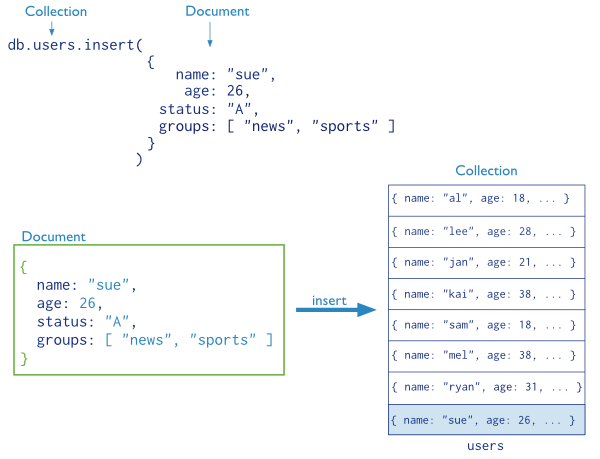
- Simply insert them using
db.collection.insert()
//Insert into the users collection
db.users.insert (
  {
    name: "Sue Person",
    age: 26,
    status: "A",
    groups: [ "students", "honors" ]
  }
)
Anatomy of an Insert
Data Types
- Document format is BSON (Binary Javascript Object Notation)
- Like JSON (Javascript Object Notation)
- Here are just a few examples of common BSON data types
Double,String,ArrayBinary,ObjectId,BooleanDate,Integer, and so on
- Most of these familiar already
ObjectIdhowever is interesting, lets take a look
ObjectId
ObjectIdis set automatically by mongo if you don’t provide_idObjectIdmade up of 12 bytes- 4 bytes - unix epoch
- 3 bytes - server
- 2 bytes - PID
- 3 bytes - randomish number
- Free created at functionality!
- Why wouldn’t mongo just use an auto incrementing id like mysql?
Retrieval
Basic Retrieval
- The most basic type of retrieval uses the
db.collection.find() - Go ahead and do a few inserts in your own database for the users collections use
db.users.find()to see that they worked!
db.users.insert({name:"Alice"});
db.users.insert({name:"Bob"});
db.users.insert({name:"Trudy"});

db.users.find();
Selecting All
- Several methods for selection
db.collection.find()db.collection.aggregate()
db.users.find();
db.users.aggregate();
Criteria Selection
It is possible to do criteria based selection
- Comparison operators:
$gt- Greater than$gte- Greater than or equal to$lt- Less than$lte- Less than or equal to$ne- Not equal to
These all work conceptually the same way they do in MySQL or programming
Example
- Lets insert some sample data we can do selection on
//drop the collection
//insert some sample
db.students.remove({});

db.students.insert({
  name: "Alice",
  age: 16,              //Genius
  grades: [70, 98, 88, 95]
});

db.students.insert({
  name: "Alice",
  age:  30,            //Not Genius
  grades: [27, 49, 52, 65]
});

db.students.insert({
  name: "Bob",
  age: 34,
  grades: [67, 75, 73, 81]
});

db.students.insert({
  name: "Trudy",
  age: 21,
  grades: [90, 98, 94, 100]
});

db.students.insert({
  name: "Joe",
  age: 27,
  grades: [40, 77, 65, 80]
});

db.students.insert({
  name: "Robson",
  age: 18,
  grades: [56, 82, 74, 68]
});
Criteria Selection
- Each of the operators is set as a property on an object that will be set as a value on the property you are testing
- In other words they are set as an expression on the property in the form of an object
- Wow!
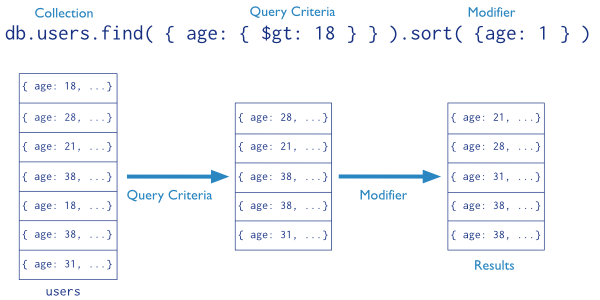
- For example, to find all students above the age of 18
db.students.find({
  age : {    //search age
    $gt: 18  // > 18
  }
});
Anatomy of find
Criteria Select
- Other criteria based operators
$in- Does any of the values in an array match?$nin- Does any of the values in the array not match
- The following selects which students are either 18 or 21
db.students.find({
  age : {
    $in: [18, 21]
  }
});
Logical Selection
- Similar to SQL you can also do logical selection
$or- logical or$and- logical and$not- opposite$nor- no match for both criteria
- The trick to using these operators is that they must be provided before specifying the field since they take an array of expressions
Logical Selection
- Selects all the documents with students named “Joe” or who are 21 or older
db.students.find({
  $or : [ //an array of expressions
    {
      name: "Joe"
    },
    {
      age: { $gte : 21 }
    }
  ]
});
Practice
- Select students named “Alice” who are also under the age of 21
Practice
- Select students named “Alice” who are also under the age of 21
db.students.find({
  $and : [ //an array of expressions
    {
      name: "Alice"
    },
    {
      age: { $lt : 21 }
    }
  ]
});
or
//So what does this tell you?
db.students.find({

      name: "Alice",
      age: { $lt : 21 }
});
Misc Operators
- Other operators
$mod- Modulus$regex- Regular expression$text- Text search (requires index)$where- Custom javascript expression$geoWithin/$geoIntersects- Geolocation matching, i.e. everything within a radius!- and more…
Array selection
- List students who have made an A or B
// What is interesting about these results?
db.students.find({
  grades: { $gte : 80}
});
Projection
- Our selections have resulted in the entire document being returned
- Much like MySQL projection can limit returned data
- i.e. -
SELECT projection FROM table
- i.e. -
- Projection is the second object passed to
.find()- Can either provide inclusion list
1OR exclusion list0 - Exception is for
_id
- Can either provide inclusion list
Projection
db.students.find(
  {},         // Criteria, or all documents
  {
    name : 1  // Projection, inclusion list only the name
  });
or
db.students.find(
  {},        // Criteria, or all documents
  {
    age : 0  // Projection, exclusion list age
  });
- Note that turning
_idon or off has no effect on inclusion list vs exclusion list
Practice time
$ mongo deltona.birdnest.org/group1
> db.auth('group1', 'group1');- Create three more students with the properties:
- name
- dorm
- name
- roomNumber
- classes an array of objects containing
- name
- days an array containing
- Days the class meets
- credits
Example
{
  name: "Alice",
  dorm: {
    name: "Thurmond",
    room: "304"
  },
  classes: [
    { name: "Databases", days: ["Monday", "Wednesday"], credits: 3 },
    { name: "Advanced Databases", days: ["Tuesday", "Thursday"] , credits: 3 },
  ]
}
Questions to Ask
- Find students with classes that meeting on Thursday
- Find students taking classes with 2 credits or more
- and so on…
Modification
Update
- To update use
db.collection.update() - The
.update()usually takes at least two parameters- The selection criteria indicating which documents to update
- The update object
- Note that the update object will replace the matched document unless you use special operators!
- It will not overwrite
_idthough
- It will not overwrite
db.students.insert({_id: 12345, name: "Gary", age: 44});

db.students.update({_id:12345}, {age:45});

db.students.find({_id:12345});
// { "_id" : 12345, "age" : 45 }
Update Operators
- These field operators do not replace the entire document
$inc- Increment (positive or negative) the field by the value$mul- Multiply the field by the value$rename- Rename the field$set- Set the field to the value$unset- Unset the field entirely (removal)$min- Set the min of existing or new value$max- Set the max of existing or new value$currentDateSet the current date/time
Update Example
db.students.remove({_id:12345}); //remove old

db.students.insert({_id: 12345, name: "Gary", age: 44});

db.students.update(
  { _id : 12345 }, //what doc to update
  { $set :
    {
      age : 45 //set the age to 45
    }
  }
);

db.students.find({_id:12345});
// { "_id" : 12345, "name" : "Gary", "age" : 45 }
Update
- Lets advance the age of all our students by one year
- What went wrong?
Update
- By default the update command updates just a single document
- Need to tell mongo you want to update
multiple documents - This is the options object (third) passed to update
- Other options are
upsertandwriteConcern - More on these later
- Other options are
- Need to tell mongo you want to update
 db.students.update(
  {},                  //Match all documents
  { $inc: {age:1} },   //Increment the age by one
  { multi:true }       //Update more than 1 document
);
Update Array Operator
- Different operators available for arrays
$- Symbolizes the first element in the array to match query conditions$addToSet- Add element to array but only if it doesn’t already exist$pop- Remove first (-1) or last (1) element in the array$pullAll- Remove all matching provided elements in the array$pull- Removes all elements from the array matching search criteria$push- Adds element to the end of the array
Update operations
- Add the grade of 100 to the student named “Robson”
db.students.update(
  {name: "Robson"},        //What to update
  {
    $push : {grades: 100}  //Push a 100 to grades array
  }
);
Update
- Other operators are available and can be found in the documentation
Removal
Removing Documents
- To remove documents use
db.collection.remove() - Removing documents does not reclaim space
- Because mongo is document oriented there will not be any violations of referential integrity
Removing Documents
.remove()takes a query object that works exactly like all previous examples- Be careful removing documents
- Unlike
.update()doing a.remove()does not work on one document by default - It can still be limited but default is limitless
- The following removes all student documents
- Unlike
db.students.remove({}); //Dang!Removing Collections
- You can remove an entire collection by dropping it
- All documents within it will also be removed
- There is no “are you sure” feature
db.students.drop();Removing Databases
- To remove a database use
.dropDatabase()
db.dropDatabase();Practice
Example Products
- Use your group account. For example, group 1:
$ mongo deltona.birdnest.org/group1
> db.auth('group1', 'group1');
db.product.drop();
db.product.insert({
name: "Batman Lego Set",
qty: 1,
price: 9.99,
company: "LEGO",
category: "Toys"
});
db.product.insert({
name: "32 Piece Ratchet Set",
qty: 2,
price: 29.99,
company: "Stanley",
category: "Tools"
});
db.product.insert({
name: "Hammer",
qty: 5,
price: 5.99,
company: "Stanley",
category: "Tools"
});
db.product.insert({
name: "Toothpaste",
qty: 1,
price: 2.99,
company: "Crest",
category: "Health"
});
db.product.insert({
name: "Floss",
qty: 0,
price: .99,
company: "Crest",
category: "Health"
});
db.product.insert({
name: "Power Drill",
qty: 5,
price: 49.99,
category: "Tools"
});
db.product.insert({
name: "120 Piece Lego Set",
qty: 1,
price: 12.99,
company: "LEGO"
});
db.product.insert({
name: "Hot-wheels Car",
qty: 10,
price: .99,
company: "Matchbox"
});Practice (1 of 3)
- Create a view showing the values of the product on hand.
- No option to do this with find. Must aggregate (don’t know how yet). Still not really a view.
- Select all the products and the category that the product is in.
- How many collections needed to be joined to recover the data?
- How many in MySQL?
- What sort of redundancy is present in either?
Practice (2 of 3)
- Select the product name and the category name of all the products.
- Select all the products, the categories they belong to, and the company the product is made by.
- How much easier is this query compared to MySQL?
- What cost does this easy query come with?
Practice (3 of 3)
4.1. Update the company “Stanley” to “Stanley Black and Decker” and re-run * How many documents needed to be updated? * How many rows would MySQL have required?
- Select all the products in the tools category with a price greater than 10.00.
- Now only those made by Stanley Black and Decker.
- Delete the matchbox company.
- Any problems?
- What’s missing?